A Better Way To Sell
Sell seamlessly across every social channel, all from one inbox.
How it works.
Get up and running in minutes — connect your channels, see every message, and start selling.
Connect your account via API
Link your Instagram or WhatsApp in a few taps. No technical setup needed – just log in and go.
Settings
Social channels
Connect your social accounts to receive and send messages from your inbox.
We connect via official APIs. We never see your passwords or access personal messages. Disconnect anytime.
See every message in one place
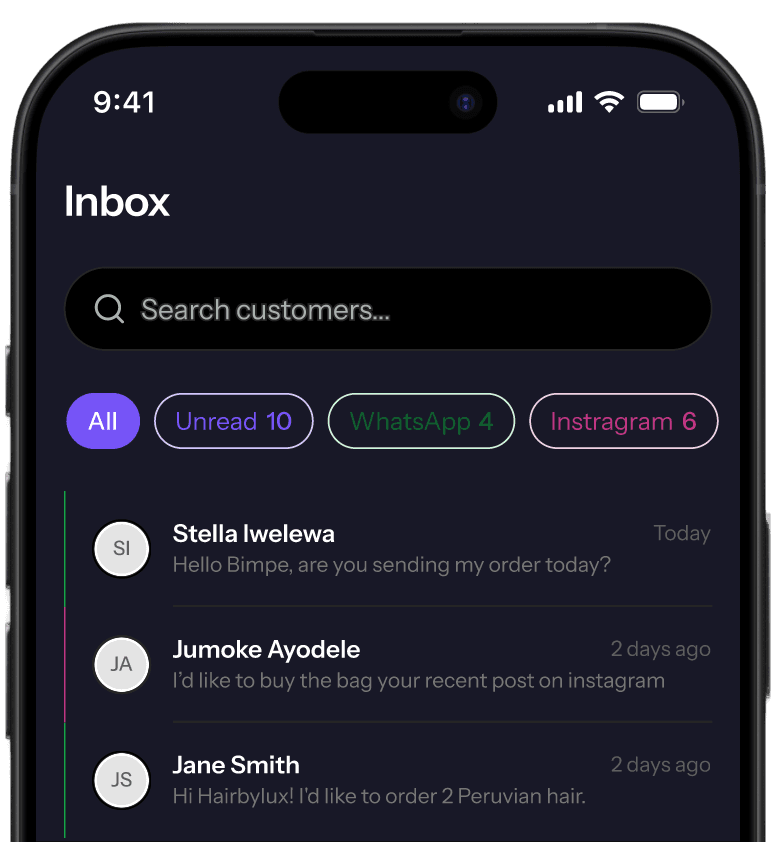
See every Instagram and WhatsApp customer in one inbox – name, past orders, and your notes, all in view.
Inbox
Hello Bimpe, are you sending my order today?
I’d like to buy the bag your recent post on instagram
Hi Hairbylux! I'd like to order 2 Peruvian hair.
Sell and manage
Reply to customers, convert chats into orders, run promos, and watch every sale – all from one dashboard.
How it works.
Get up and running in minutes — connect your channels, see every message, and start selling.
Connect your account via API
Link your Instagram or WhatsApp in a few taps. No technical setup needed – just log in and go.
Settings
Social channels
Connect your social accounts to receive and send messages from your inbox.
We connect via official APIs. We never see your passwords or access personal messages. Disconnect anytime.
See every message in one place
See every Instagram and WhatsApp customer in one inbox – name, past orders, and your notes, all in view.
Inbox
Hello Bimpe, are you sending my order today?
I'd like to buy the bag your recent post on instagram
Hi Hairbylux! I'd like to order 2 Peruvian hair.
Sell and manage
Reply to customers, convert chats into orders, run promos, and watch every sale – all from one dashboard.
Social selling, without the chaos.
One inbox for every WhatsApp and Instagram chat — order history, notes, and automatic follow-up, all in view.
Stop switching between WhatsApp and Instagram all day. Meerakl pulls every conversation into one inbox, with each customer's full history right beside the chat.
Open any chat and see who they are, what they've bought, and every note you've taken – so every reply feels personal, even when you have hundreds of customers.
Create orders from any chat, confirm payments automatically, and follow every sale from first message to delivery – all without leaving the inbox.
One tap to broadcast. Every reply in your inbox. Track opens, replies, and orders from each promo – so you know what actually drove the sale.
Automatic follow-ups for unpaid orders, abandoned carts, and customers who went quiet. Every nudge is in your brand's voice, so it feels like you, even when you're asleep.
See your best sellers, top customers, and which channel drives the most sales at a glance. Spot trends in seconds, and double down before they cool.
Your data stays yours
We built Meerakl so your customers' information is never exposed. Here's how we keep it safe.
Bring your own WhatsApp Business, Instagram, and Paystack – money goes straight to your bank, customer data stays in your account. You're in charge; Meerakl just makes the work easier.
Each workspace is fully isolated, with encryption in transit and at rest. Your customer chats, orders, and contacts stay private – never shared, never used to train AI, never seen by another business.
We don't sell your customer data. We don't mine your DMs for ads. We don't share anything with third parties. Meerakl's only customer is you.
Simple, transparent pricing
Start free, upgrade when you're ready. No hidden fees, no surprises.
Free
Perfect for trying Meerakl with your first customers
Get started freeAll messages in one place
Read and reply across Instagram and WhatsApp
Branded public storefront
List up to 10 products on your own .meerakl.com link
Up to 50 contacts
Manage your first customers
Order tracking
Create and track orders from chat
Bank transfer payments
Send your bank details to customers from chat
10 promos/month
Send bulk messages to your list
3 saved replies
Respond faster with ready-made messages
For businesses ready to sell more and save time
Join WaitlistUnlimited contacts & promos
No limits on your customer base or promotions
Smart inbox
Manage your first customers
Payment links via Paystack
Collect payments directly from chat
Unlimited storefront listings
No cap on active products — show your full range
Personalized promos
Use customer names and schedule for later
Customer insights
See who's buying, who's gone quiet, and who's your best customer
Auto-replies & follow-ups
Meerakl chases payments and follows up for you
Instagram comment capture
Turn comments into conversations and leads
For established businesses that need the full toolkit
Join WaitlistEverything in Pro
Plus tools to see the bigger picture
Deal tracker
Follow every deal from first message to close
Reports & insights
Revenue trends, channel breakdown, and top customers
Customer insights
See who's buying, who's gone quiet, and who's your best customer
Auto-replies & follow-ups
Meerakl chases payments and follows up for you
Do you have questions? Find answers below
Instagram DMs and WhatsApp — all in one dashboard. Connect your accounts in minutes and see every conversation in one place.
Yes. Your existing apps keep working normally. Meerakl runs alongside them — every DM lands in both your app and your Meerakl dashboard.
Log in with your Instagram or WhatsApp Business account and authorize Meerakl. No technical setup — the whole process takes about 2 minutes.
Instagram DMs are free. WhatsApp messages are billed directly by Meta at low per-conversation rates — Meerakl never marks them up. Your subscription covers the dashboard, inbox, orders, promos, and automations.
Yes. All data is encrypted, every business is fully isolated at the database level, and we comply with NDPR. We don't mine, sell, or share your data with anyone.
Of course. Upgrade from your dashboard anytime — it takes effect immediately. You only pay the difference for the rest of your billing period.